Blog · October 28, 2026
Business Cards Before the Harvest Dinner: A Farm-to-Table Chef's SkyCanvas Workflow
A pop-up chef hired a new sous chef on Tuesday and had a sold-out harvest dinner on Friday. Here is how she designed brand-matched business cards with a scannable profile QR in one evening on SkyCanvas.
Marisol Vega runs Copper Thistle Supper Club out of her truck, a stack of folding chairs, and a shared notebook with the farmers who grow her tomatoes. Each dinner moves. One Friday it is a cider orchard outside Walla Walla, the next it is a corner of a vineyard barn with the big doors rolled open. The guests find out by word of mouth and by the little printed cards Marisol presses into their hands at the farmers market on Saturday mornings.
This week the schedule got tight. On Tuesday she hired Elena Ruiz as her new sous chef, exactly three days before a sold-out harvest dinner for forty guests. Elena needed cards by Friday evening. Not placeholder cards, real ones, matching the Copper Thistle look, with a QR that would take a curious diner to the reservation page without Marisol having to explain the whole supper club at the end of a long service.
Marisol opened SkyCanvas after prep on Wednesday night, with a cutting board still on the counter and a glass of pet-nat going warm. By the time she closed her laptop she had a short link, a brand-colored QR code, and a run of business cards designed by the AI in the editor. Here is exactly what she did.
- Fill in the Copper Thistle profile first
Before anything else, Marisol filled out her SkyCanvas profile. The AI designer reads this later, so getting the voice right here saves a lot of back and forth in the editor.
She typed the company name, the tagline about seasonal pop-up dinners from the valley’s small farms, the industry (farm-to-table pop-up dining), and the services list: monthly harvest dinners, private chef events, cooking classes, and chef’s table tastings. For audience she wrote “food lovers, farmers market regulars, couples hunting a date night that feels like a secret.” That line matters. The AI uses it to pick a mood later.
The SkyCanvas profile page filled in with Copper Thistle’s business details, tagline, industry, services, and audience. (https://skycanvas.online/uploads/blog/business-cards-harvest-dinner-farm-to-table-chef/01-profile.png)
- Create one short link for every seat
The card needs one destination. Not a homepage, not a menu PDF, just a single page where a guest can see upcoming dinners and reserve a seat.
Marisol clicked Links, then New short link, and filled it in:
- Destination: the Copper Thistle reservation page
- Title: Reserve a Seat at the Harvest Table
- Description: Upcoming Copper Thistle dinners, chef’s table seats, and the private event waitlist
- Custom slug: harvest-table
The right side of the form showed a live QR preview as she typed, which was useful because she already knew she wanted the final short URL to be memorable enough to say out loud at the dinner.
The new short link form filled in with destination, title, description, and the custom slug, with a live QR preview on the right. (https://skycanvas.online/uploads/blog/business-cards-harvest-dinner-farm-to-table-chef/02-link_new.png)
- Grab the short URL and the QR
As soon as she hit save, SkyCanvas gave her the link detail page. The short URL came out as skyc.online/harvest-table, with the destination listed underneath and the generated QR code ready to download as a PNG.
This is the page she will come back to any time she wants to see how the link is performing. For tonight she only needed two things: the short URL to say out loud when guests ask (“just scan the card, or go to skyc dot online slash harvest-table”), and the QR itself for the cards.
The link detail page showing the skyc.online short URL, the destination, and the generated QR code ready to download. (https://skycanvas.online/uploads/blog/business-cards-harvest-dinner-farm-to-table-chef/03-link_created.png)
- Repaint the QR in Copper Thistle colors
A black QR on a chef’s card would look fine, but Copper Thistle has a specific palette: a deep burnt sienna called out in the brand, and a warmer copper that shows up on the signage. Marisol opened the QR style panel on the link page and dropped in two hex values: #7A2B1E for the deep tone and #C98A2E for the copper, over a white background.
The preview updated as she clicked. The modules turned into a soft gradient that still scanned cleanly from a phone across a dim table. That mattered. These dinners happen at dusk with candles.
The QR customization panel on the link page with Copper Thistle’s burnt sienna and copper brand colors applied to the modules, with a live preview. (https://skycanvas.online/uploads/blog/business-cards-harvest-dinner-farm-to-table-chef/04-qr_custom.png)
- Start the business card at the right size
From the top menu she clicked Marketing materials, then New. The dialog asked for a title and a size preset. She typed “Copper Thistle Business Card, Sous Chef” and chose the Custom preset at 1050 by 600 pixels, horizontal, which is the standard US business card ratio at a print-friendly resolution.
The important box on this screen is the short link selector. She picked Reserve a Seat at the Harvest Table from the dropdown. That tells SkyCanvas to pre-place that specific link’s QR code in the design, in her brand colors, so the AI does not have to invent one.
The new marketing material dialog with the title filled in, Custom size preset chosen at business card dimensions, and the Copper Thistle short link selected so its QR will be placed in the design. (https://skycanvas.online/uploads/blog/business-cards-harvest-dinner-farm-to-table-chef/05-flier_new.png)
- Meet the editor, then hand off to Design with AI
The design editor opened on a blank card-sized canvas, with the toolbox down the left (text, shapes, images, brush, bucket, line, arrow, polygon, star, picture frame, pencil, eraser, paint, magic wand). The layers panel sat on the right. In the top toolbar, the Design with AI button glowed in SkyCanvas blue.
Marisol could have laid the card out by hand, and some nights she will. Tonight she had service in forty minutes.
The SkyCanvas design editor open on a blank business card canvas, with the drawing tools down the left, the layers panel on the right, and the Design with AI button in the top toolbar. (https://skycanvas.online/uploads/blog/business-cards-harvest-dinner-farm-to-table-chef/06-flier_editor.png)
- Write a vivid brief and pick Real photo
The Design with AI modal opened with a big text area. She typed a plain-English brief: a moody, candlelit harvest table at dusk, reclaimed wood, a copper tray, a sprig of rosemary, a halved heirloom tomato catching the light, burnt sienna and ember copper tones, the brand mark COPPER THISTLE at the top left with SUPPER CLUB in small caps underneath, the name Elena Ruiz in the center with Sous Chef in italic beneath, three stacked contact lines in the lower left, and the pre-placed QR in the lower right with the tiny label Reserve a seat.
Underneath the brief she switched the background mode to Real photo, which tells SkyCanvas to art-direct a photographic background rather than a flat shape fill. That is what makes the card feel like a dinner invitation instead of a template.
The Design with AI modal with a plain-English brief filled in and the Real photo background mode selected so SkyCanvas will art-direct a photographic design. (https://skycanvas.online/uploads/blog/business-cards-harvest-dinner-farm-to-table-chef/07-flier_ai_brief.png)
- The finished card, every piece editable
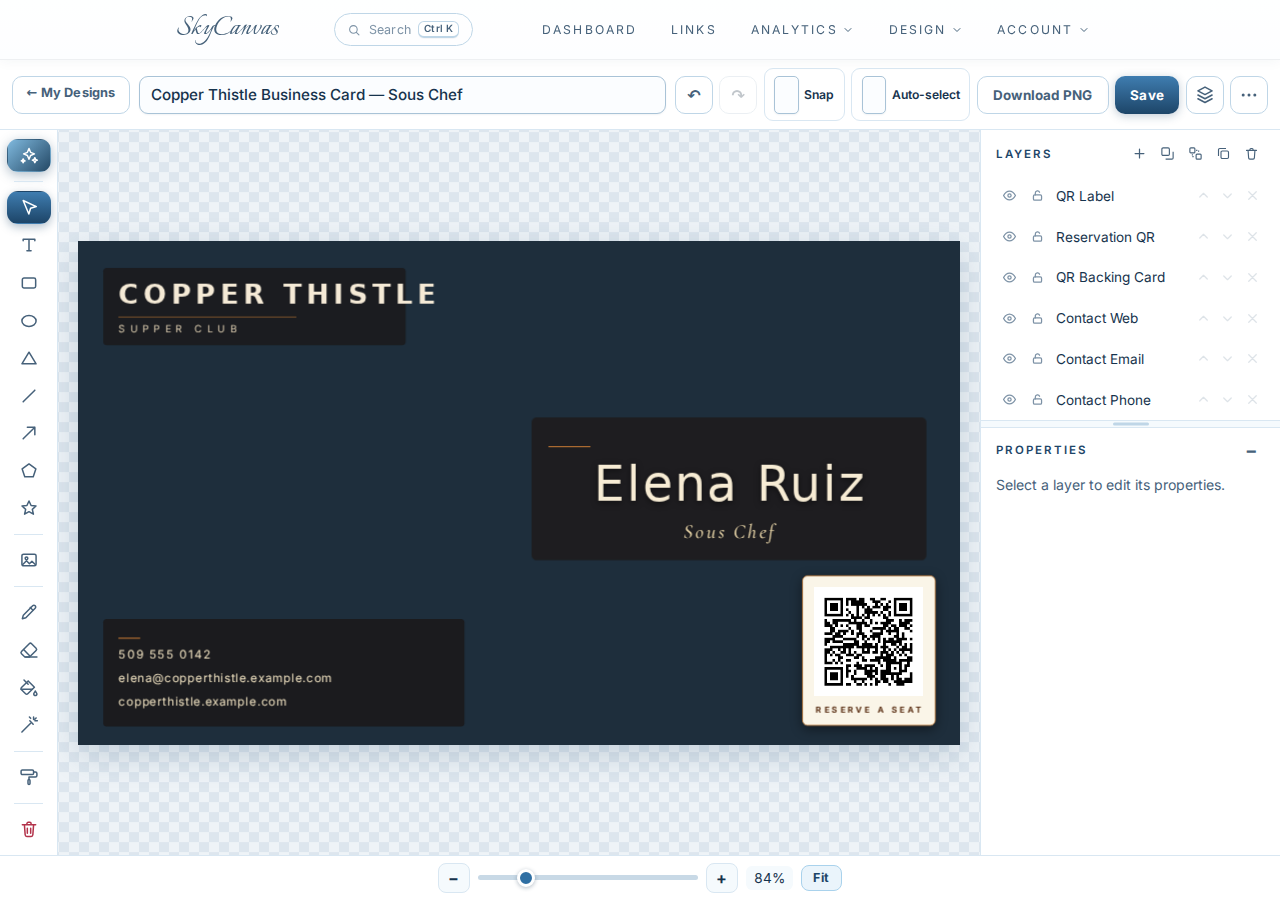
A few minutes later the canvas filled in. The background came back as a dim-lit harvest-table feel in deep navy with copper accents. The COPPER THISTLE mark sits in warm cream at the top left with SUPPER CLUB spaced in small caps underneath. The center-right holds Elena Ruiz with Sous Chef in a slimmer italic beneath. The lower left stacks her phone, email, and the copperthistle.example.com web line in clean cream type. The lower right carries the brand-colored QR, with Reserve a seat tucked under it in small caps.
Every one of those pieces came in as its own editable layer. Marisol could still swap Elena’s name for the next hire, nudge the QR, or tighten the contact block. For tonight she sent the PNG to the local print shop and had cards in Elena’s apron pocket by Friday afternoon.
The finished AI-designed Copper Thistle business card on the SkyCanvas canvas, with the headline, contact lines, brand-colored QR, and layout all generated from the brief as editable layers. (https://skycanvas.online/uploads/blog/business-cards-harvest-dinner-farm-to-table-chef/08-flier_ai_result.png)
What changed for Copper Thistle
At the harvest dinner, Elena worked the room during the cheese course the way sous chefs do, shaking hands and taking compliments. Each guest left with a card. By Monday morning, Marisol watched the reservation page fill the January chef’s table in two days, from scans that all traced back to skyc.online/harvest-table.
She did not learn a new design tool. She wrote one honest brief, picked her brand colors, and let SkyCanvas place the pieces.
If you are running a small food business with a new hire and a dinner on the calendar, you can set up the same workflow for free at skycanvas.online/register. One profile, one short link, one branded QR, and a card you would be proud to hand to a stranger.
Copper Thistle Supper Club is a fictional business we created to show a real SkyCanvas workflow. Every screenshot is real, captured live while writing this guide.