Blog · October 30, 2026
Open Studio Saturday: How a Neon Sign Restorer Printed a Glowing Window Poster Before Doors Opened
Ruth needed a window poster for her neon restoration shop's open studio night by Friday afternoon. Here is how she went from blank canvas to a glowing printed poster, with a branded QR code to the RSVP page, in a single sitting on SkyCanvas.
Ruth Vega runs Argon Alley Neon Works out of a narrow brick workshop off Boston Avenue in Tulsa. For most of the week, the shop is quiet in the way that only a glass-bending studio can be quiet, with the low hiss of a torch and the hum of a transformer warming up a rescued motel arrow. On Saturdays, though, Ruth likes to open the roll-up door and let neighbors wander in.
This Saturday was going to be bigger. She had hand-lettered a loose plan for an “Open Studio Saturday” with live glass bending, free coffee, and a row of restored diner signs she had just finished for a client up in Bartlesville. Her partner Dev was handling drinks. Ruth was handling, somehow, everything else. By Friday morning the one thing she still did not have was the poster she wanted taped in the front window.
She had maybe two uninterrupted hours before a client pickup. She needed a short RSVP link, a QR code that matched the shop’s palette of hot pink and amber, and a real printable 11 by 17 poster for the window. One sitting, start to finish. She logged into SkyCanvas and started with the link.
- Create the short link to the RSVP page
Ruth already had a simple RSVP page on her site at argonalley.example.com/open-studio. She did not want to put that full URL on a poster, and she wanted scan counts afterward so she could judge whether to do another open studio in December.
From the dashboard she opened Links, then New short link. She pasted the destination URL, gave the link a clear title, wrote a one-line description, and set a custom slug so the short URL would read naturally: neon-open-studio. On the right side of the form, SkyCanvas already showed a live QR preview updating as she typed.
The new short link form filled in with destination URL, title, description and custom slug, with a live QR preview on the right. (https://skycanvas.online/uploads/blog/neon-sign-restoration-open-studio-poster-skycanvas/01-link_new.png)
- Grab the short URL and the QR
She clicked Create. The link detail page came up with the short URL already laid out as skyc.online/neon-open-studio, the full destination underneath, and a downloadable QR code on the right. This is the view Ruth tends to screenshot and text to Dev so he knows what she is handing out that week.
The link detail page right after creating the short link, showing the skyc.online short URL, the destination, and the generated QR code ready to download. (https://skycanvas.online/uploads/blog/neon-sign-restoration-open-studio-poster-skycanvas/02-link_created.png)
- Restyle the QR in the shop’s neon palette
The default QR is black on white, which is tidy but a little bank-statement for a neon shop. Ruth opened the QR customization panel on the same page and swapped the module color to the shop’s hot pink, with amber as the second gradient stop. White background, so it would still scan cleanly against the dark photograph she was already picturing for the poster.
The preview on the right updated as she dragged the color pickers. She nudged the gradient angle until the amber warmed up the lower half of the code, saved, and moved on. The link’s QR is now that colored version everywhere it appears in SkyCanvas, including inside any design she makes.
Customizing the QR code style on the link page, with brand colors applied to the QR modules and a live preview. (https://skycanvas.online/uploads/blog/neon-sign-restoration-open-studio-poster-skycanvas/03-qr_custom.png)
- Start a new marketing material at poster size
From there Ruth went to Marketing Materials and clicked New. She named the piece “Open Studio Saturday, Argon Alley Window Poster” and picked the US Letter preset so the finished file would print cleanly on an 11 by 17 at her neighborhood print shop with a small bleed. She selected the neon-open-studio link from the dropdown so its QR would be pre-placed in the design.
Starting a new marketing material with a title, a size preset, and the short link selected so its QR gets placed into the design. (https://skycanvas.online/uploads/blog/neon-sign-restoration-open-studio-poster-skycanvas/04-flier_new.png)
- Open the editor and get oriented
The editor opened to a tall white canvas with the QR already sitting as its own layer in the lower right. Ruth has used the editor before for small handouts, so the layout was familiar: canvas in the middle, drawing and text tools down the left side, layers panel on the right. The Design with AI button sits in the top toolbar. She could have placed every element herself, but with a client pickup an hour away she opted for AI and planned to tweak after.
The SkyCanvas design editor with the canvas, drawing tools, layers panel and the Design with AI button in the toolbar. (https://skycanvas.online/uploads/blog/neon-sign-restoration-open-studio-poster-skycanvas/05-flier_editor.png)
- Write a vivid AI brief
Design with AI opens a modal that takes a plain-English description. Ruth has learned that the briefs that work best are the ones she would give a human designer if she had one, specific about imagery, mood, palette, and exactly where the QR should sit.
She described a dim brick workshop lit by restored neon on exposed brick, a cursive hot pink DINER sign, an amber motel arrow, a cobalt blue palm tree, and warm Edison bulbs over a cluttered workbench. In the lower left, a close shot of a gloved craftsman bending glass over a bright torch flame. Big slab-serif OPEN STUDIO SATURDAY across the top with a soft neon outer glow, ARGON ALLEY NEON WORKS underneath in tight-tracked caps, and a clean info block with the date, time, address, and the lines live glass bending demos, free coffee, vintage neon for sale. Finally, QR anchored on a white panel in the lower right with a Scan to RSVP caption so it would read against the dark photo.
She selected Real photo as the background mode so the AI would art-direct a true photographic scene rather than illustrate it, and hit Generate.
The Design with AI modal with a plain-English brief and the Real photo background mode selected. (https://skycanvas.online/uploads/blog/neon-sign-restoration-open-studio-poster-skycanvas/06-flier_ai_brief.png)
- The finished poster, back on the canvas
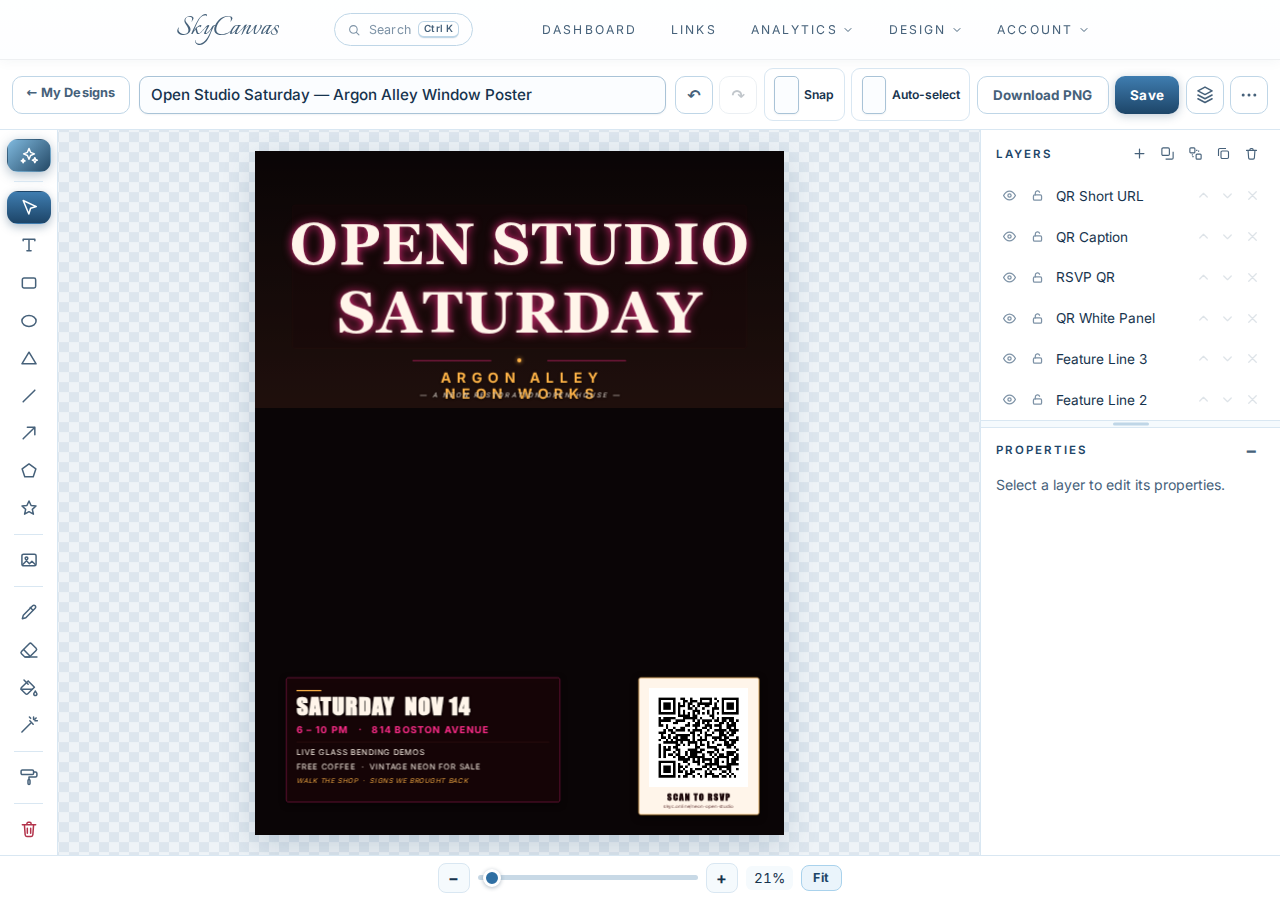
A few minutes later the result dropped onto the canvas as ordinary editable layers. The hero is exactly the dim brick scene Ruth asked for, with OPEN STUDIO SATURDAY glowing across the top in a thick retro slab and ARGON ALLEY NEON WORKS set tight underneath. The information block in the lower left carries Saturday November 14, 6 to 10 pm, 814 Boston Avenue, and the three lines about live glass bending, coffee, and vintage neon for sale. The brand QR sits on its clean white panel in the lower right with the Scan to RSVP caption, exactly where she asked for it.
The finished AI-designed poster sitting on the canvas as editable layers: a dark glowing workshop scene with the headline, info block and brand QR all in place. (https://skycanvas.online/uploads/blog/neon-sign-restoration-open-studio-poster-skycanvas/07-flier_ai_result.png)
Because every element is a real layer, Ruth made two quick tweaks: she nudged the headline up a few pixels so none of the glow fell behind the roll-up door frame when taped to the glass, and she bumped the address line a touch bolder. Then Download PNG, over to the print shop at lunch, 11 by 17 on heavy stock by 4 pm, and taped in the front window before Dev got there with the coffee urn.
What changed on open studio night
By 7:30 pm the shop was full. Scans on the neon-open-studio link had been trickling in since Friday evening, with a jump around Saturday noon when a neighbor posted a photo of the window. Ruth is already thinking about a December Lantern Night using the same workflow: a new short link, the same hot pink and amber QR, and a fresh AI brief with lanterns instead of torch flame.
If you have a one-night event and the poster is the last thing standing between you and the door opening, you can set up the same way, free, at skycanvas.online/register.
Argon Alley Neon Works is a fictional business we created to show a real SkyCanvas workflow. Every screenshot is real, captured live while writing this guide.